A while back I posted some performance results of the Flex 4 Spark architecture vs. the Flex 3 mx architecture. In that post, I stated that the Spark components created a smaller binary deliverable. I hypothesized that this smaller binary size was due to the reusability of the Spark components and a result of fewer class definitions needed to create the code.
Some readers have suggested that the smaller application size was actually due to the default use of Runtime Shared Libraries in Flex 4 and that if I changed the Flex 3 application to use RSLs that it would be smaller. Another possible issue raised was that I used the debug version of the player to get the total runtimes.
So I recompiled, using RSLs in the Flex 3 application, and tested again, this time using the runtime player (version 10.2.154.27). The Flex 4 application was still about 30% smaller, at 55,866 bytes. The Flex 3 application weighed in at 80,645 bytes. Flex 4 still performed an average of 137% slower, or 384.38 ms slower on average than Flex 3.
I also generated a link report using -link-report. The Flex 4 build link-report reported 135 total references. The Flex 3 build link-report reported 480 total references. I assume that this proves my hypothesis that the Flex 4 Spark architecture reuses more code. I could be incorrect though. I look forward to hearing from someone who has more insight into interpreting mxmlc generated link-reports than I do to confirm or correct my analysis.
Happy Coding.
Tuesday, May 3, 2011


Thursday, March 10, 2011
Pingy - Mass Pinging Tool: Explanation - What Pingy Does?
Pingy - Mass Pinging Tool: Explanation - What Pingy Does?: "In blogging, ping is an XML-RPC-based push mechanism by which a weblog notifies a server that its content has been updated.[1] An XML-RPC ..."
If you have a blog, and want to promote it to search engines, Pingy might just be the tool for you. I found it in the stats for my blog as a referrer. The service is free, so if you are looking for new ways to get people to your blog, you might want to check Pingy out.
Watch out .nethead!
HP fired a shot heard round the PC world today with its announcement that webOS is coming to the desktop. Are the salad days over for Windows now that two PC manufacturers have decided to ship Linux-based operating systems on their hardware?
I think the answer is yes. Today we saw a big manufacturer make the first move towards against outside operating system interference. The move also points to a future where EcmaScript, CSS3, and HTML5 rule the end-user application space. The true challenge will come from the reluctance of entrenched corporate IT infastructures built on Microsoft's solutions from end-to-end.
HP is not likely to force the issue on the corporate world—the computers will still be able to run Windows. However it is software that drives the adoptance of operating systems, and software developers' language/toolkit of choice that drives what software gets developed. For the first time ever, Microsoft's CLR army may be pitted against another army of developers that outnumber it, each soldier armed with better weapons in the arsenal of webkit + ecmascript than CLR + WPF/Azure/xaml can provide. Perhaps it is time to begin developing some messaging frameworks to the linux kernel from javascript and to learn webOS... Let the great battle between interpreted and compiled begin!
Wednesday, March 9, 2011
Flex 3 vs Flex 4...A performance comparison.
EDIT: I've reported this as a bug on Adboe's Jira, go there and vote for it: http://bugs.adobe.com/jira/browse/SDK-29904
EDIT: I've posted a follow up to this post using the non-debug player: http://jackviers.blogspot.com/2011/05/flex-3-vs-flex-4-follow-up.html
A week ago, a friend and respected colleague of mine, Paul Smith IV, mentioned in passing that Flex 4 was slower than Flex 3. He had no quantitative data to back up the claim and a quick perusal of Google didn't reveal anything either. About to embark on a large migration of a Flex 3 codebase at work, I decided that a performance comparison was in order. My findings show that the average Flex 4 component is 163.41% slower, or 531.77 ms slower, than its direct Flex 3 counterpart, and that difference in component performance increases application startup time linearly in statically defined applications and also applies generally logarithmically as components are dynamically added to the application view. Though Flex 4 applications perform slower, they produce .swf files 82.26% smaller than Flex 3 applications. On a 512 kbps line with 10% overhead, this results in 88.89% faster download times with Flex 4 vs. Flex 3. If the average human speed of perception is 16ms, the perceived performance gain using Flex 4 is 87.97% over Flex 3. Because this perceived performance only applies to initial load, the questions arise: Should Flex 4 be used in large, dynamically downloaded applications? Do the benefits of code reuse by developers, easier view management, and separation of concerns inherent in Flex 4's spark component architecture outweigh the performance degradation at runtime as compared to Flex 3?
EDIT: I've posted a follow up to this post using the non-debug player: http://jackviers.blogspot.com/2011/05/flex-3-vs-flex-4-follow-up.html
A week ago, a friend and respected colleague of mine, Paul Smith IV, mentioned in passing that Flex 4 was slower than Flex 3. He had no quantitative data to back up the claim and a quick perusal of Google didn't reveal anything either. About to embark on a large migration of a Flex 3 codebase at work, I decided that a performance comparison was in order. My findings show that the average Flex 4 component is 163.41% slower, or 531.77 ms slower, than its direct Flex 3 counterpart, and that difference in component performance increases application startup time linearly in statically defined applications and also applies generally logarithmically as components are dynamically added to the application view. Though Flex 4 applications perform slower, they produce .swf files 82.26% smaller than Flex 3 applications. On a 512 kbps line with 10% overhead, this results in 88.89% faster download times with Flex 4 vs. Flex 3. If the average human speed of perception is 16ms, the perceived performance gain using Flex 4 is 87.97% over Flex 3. Because this perceived performance only applies to initial load, the questions arise: Should Flex 4 be used in large, dynamically downloaded applications? Do the benefits of code reuse by developers, easier view management, and separation of concerns inherent in Flex 4's spark component architecture outweigh the performance degradation at runtime as compared to Flex 3?
Test Machine Hardware and OS
MACHINE: MacBookPro5.2
PROCESSOR NAME: Intel Core 2 Duo
PROCESSOR SPEED: 3.06 GHz
RAM: 4 GB
OPERATING SYSTEM: Mac OS X 10.6.6 (10J567)
Kernel: Darwin 10.6.0
Browser and Flash Player Version
BROWSER VENDOR: Mozilla
BROWSER VERSION: Firefox 3.6.15
FLASH PLAYER VERSION: 10.2.152.33 Debug
Tests
Flex3PerformanceTest
StaticFlex3PerformanceTest100
StaticFlex3PerformanceTest150
StaticFlex3PerformanceTest200
StaticFlex3PerformanceTest250
StaticFlex3PerformanceTest300
StaticFlex3PerformanceTest600
StaticFlex3PerformanceTest1000
Flex3DynamicPerformanceTest
Test Source Code
The source code for these tests can be retrieved and viewed from GitHub at https://github.com/jackcviers/Flex-3---Flex-4-Performance-Test.
Test SDKs
Flex 3: Flex 3.5
Flex 4: 4.1.0.16076
Test Methodology
According to Adobe's DevNet article "Differences between Flex 3 and 4", the following are the Flex 3 components and their new Flex 4 counterparts, separated by a "/" character (original table):
MACHINE: MacBookPro5.2
PROCESSOR NAME: Intel Core 2 Duo
PROCESSOR SPEED: 3.06 GHz
RAM: 4 GB
OPERATING SYSTEM: Mac OS X 10.6.6 (10J567)
Kernel: Darwin 10.6.0
Browser and Flash Player Version
BROWSER VENDOR: Mozilla
BROWSER VERSION: Firefox 3.6.15
FLASH PLAYER VERSION: 10.2.152.33 Debug
Tests
Flex3PerformanceTest
StaticFlex3PerformanceTest100
StaticFlex3PerformanceTest150
StaticFlex3PerformanceTest200
StaticFlex3PerformanceTest250
StaticFlex3PerformanceTest300
StaticFlex3PerformanceTest600
StaticFlex3PerformanceTest1000
Flex3DynamicPerformanceTest
Flex4PerformanceTest
StaticFlex4PerformanceTest100
StaticFlex4PerformanceTest150
StaticFlex4PerformanceTest200
StaticFlex4PerformanceTest250
StaticFlex4PerformanceTest300
StaticFlex4PerformanceTest600
StaticFlex4PerformanceTest1000
Flex4DynamicPerformanceTest
Test Source Code
The source code for these tests can be retrieved and viewed from GitHub at https://github.com/jackcviers/Flex-3---Flex-4-Performance-Test.
Test SDKs
Flex 3: Flex 3.5
Flex 4: 4.1.0.16076
Test Methodology
According to Adobe's DevNet article "Differences between Flex 3 and 4", the following are the Flex 3 components and their new Flex 4 counterparts, separated by a "/" character (original table):
 |
| Fig 1: Flex 3 Components and Flex 4 analogues. |
For the tests to be valid, I trimmed out the components that had Flex 4 spark.primitives.* analogues, because the Flex 4 primitives are not "components" and do not adhere to the Flex Component Lifecycle. I also used mx.controls.Image in both Flex 3 and Flex 4 as there is no analogue in Flex 4 for the behavior of mx.controls.Image present in Flex 3.
I then set up three types of tests: the first statically defined an application and each of the components in Fig. 1 above, using the Flex 3 MX Components to define the Flex 3 version of the test and the Flex 4 Spark Components to define the FLex 4 version of the test, the second using the longest running component from the first test to test if the amount of instances statically defined at author time had any effect on performance, and the third to test if the amount of runtime changed as the longest running component from test 1 was added to the stage dynamically.
Test 1
Two Flex Projects were created in Flash Builder 4, one for Flex 3 and one for Flex 4. The applications' flex lifecycle events (preinitialize, initialize, creationComplete, and applicationComplete) were bound to corresponding handlers that recorded the times for each event in a dynamic AS3 Object instance. The object instance's top level key was "testerApp". The times were stored in a secondary AS3 Object instance nested under the "testerApp" key as "preinitializeTime", "initializeTime", "creationCompleteTime" and "applicationCompleteTime". Each component defined in mxml was bound to the flex lifecycle events and handlers for "preinitialize", "initialize", and "creationComplete". The only difference between the handlers in the test applications was to cast the Flex 4 IVisualComponent instances to UIComponent instances to obtain the components' ids to create keys in the time recording Object instance. At "applicationComplete" the application looped through all the immediate visual children of the applications, tracing the time elapsed for each component between "initialize" and "creationComplete" along with the components' id property.
Test 2
In the same two Flex Projects, I created several more applications to test the longest running components from Test 1 above (in both cases the mx/spark Button component) defined at runtime in non-repeater statically defined component instances numbering 100, 150, 200, 250, 300, 600, and 1000. Each component and the application and measurement was bound to lifecycle events and measured as in test 1, with the results traced as in Test 1.
Test 3
In the same two Flex Projects I created an additional application to test dynamic addition at runtime of the longest running components from Test 1 above (again, mx/spark Button components). In this version of the test I added a timer that added the instances dynamically every 10 ms for 1000 repetitions and measured the results as in the above two tests after the 1000th repetition. The timer was created in the applications' preinitialize event handler and started at application complete.
Expectations and Assumptions
Before running the test, I expected that Flex 4 would be an improvement over Flex 3 in performance. The pattern of Separation of Concerns used in Flex 4 architecture should have and did allow framework developers to reuse more business/behavioral classes to display vastly different look and feels necessary for common control components. The visual characteristics for the skins should have been in smaller and more performant classes. All bindings should have been reduced and the code reuse for the various components should have allowed for more time testing and improving code performance. Additionally, the base classes of both frameworks existed in the previous Flex 3 release and should have been improved by the community over the time period between 3.5 and 4.1's release.
Results
To see the Raw Data, download the enclosed Excel Spreadsheet.
Test 1
| Component | Difference | Percentage Increase | |
| mxButton/sButton | 592 | 147.26% | |
| mxButtonBar/sButtonBar | 600 | 156.66% | |
| mxCheckBox/sCheckBox | 602 | 160.53% | |
| mxComboBox/sDropDownList | 600 | 163.04% | |
| mxHorizontalList/sHList | 601 | 170.25% | |
| mxHScrollBar/sHScrollBar | 585 | 167.14% | |
| mxHSlider/sHSlider | 591 | 173.31% | |
| mxImage/mxImage | 579 | 170.80% | |
| mxLinkBar/sLinkBar | 571 | 171.99% | |
| mxLinkButton/linkButton | 572 | 174.39% | |
| mxList/sList | 571 | 175.69% | |
| mxNumericStepper/sNumericStepper | 556 | 171.60% | |
| mxRadioButton/sRadioButton | 520 | 163.01% | |
| mxTextArea/sTextArea | 513 | 161.32% | |
| mxTabBar/sTabBar | 500 | 158.73% | |
| mxTextInput/sTextInput | 504 | 162.58% | |
| mxTileList/sTileList | 501 | 162.66% | |
| mxToggleButtonBar/sToggleButtonBar | 489 | 159.28% | |
| mxVScrollBar/sVScrollBar | 493 | 162.71% | |
| mxVSlider/sVSlider | 488 | 162.67% | |
| mxCanvas/sGroup | 485 | 163.85% | |
| mxControlBar/sControlBar | 483 | 163.18% | |
| mxHBox/sHGroup | 467 | 158.31% | |
| mxVBox/sVGroup | 467 | 158.31% | |
| mxPanel/sPanel | 469 | 160.62% | |
| mxTile/sTile | 427 | 148.78% | |
| Total Time Application | 671 | 143.68% | |
| Total Time Components | 13826 | 163.41% | |
| Total Component Classes | -9 | -33.33% | |
| Lines of Code | 474 | 112.86% | |
| Application Size | -453500 | -82.26% | |
| Download Time | -8 | -88.89% | |
| Perceived Performance | -520.5 | -87.97% | |
 |
| Fig 2. Actual Component runtimes from Flex 4(Red) and Flex 3(Blue). mx Precedes component names in Flex 3, s precedes component names in Flex 4. |
What is particularly interesting in both the table and chart above is that Flex 4 is about 1.5 times slower at runtime than Flex 3. However, the file size produced by Flex 4 is 82% smaller despite needing 474 more lines of mxml and ActionScript 3 code to achieve. I believe that the decrease in file size is in direct correlation with the code reuse enabled by the new skinning architecture in Flex 4. As you can see, there were nine less component classes needed to create the analogous test applications.
To calculate perceived performance, I used 16 ms as the time it takes for the human eye to perceive change. Since the download time on anything above 512Kbps based on the size of the produced Flex 4 swf was 0 seconds, I used 512Kbps to estimate download time. The Flex 4 swf downloads 9 seconds faster than the larger Flex 3 swf, an ~89% improvement in download time. This results in a human perceived performance gain in the Flex 4 application, because though it runs slower it downloads much faster and can start earlier after page load than the Flex 3 application. Because the test applications were small (an application with only 26 components, each), and because application complete time was less than the total amount of component rendering time, I decided that further testing was necessary, and decided to test the run time of statically defined Flex 4 applications vs. statically defined Flex 3 applications. To do this test, I selected the poorest performing component from each framework (the Button component) and tested them with 100, 150, 200, 250, 300, 600, and 1,000 buttons on the display list. I wanted to test all the way to 20,000, but the mxmlc build failed with not enough memory at 10,000 buttons in Flex 4.
Test 2
For this test I was only interested in the time it took for the application to run between "preinitialize" and "applicationComplete". The results are below:
| Application | Flex3Time | Flex4Time | Difference | Percentage | |
| 50 | 190 | 437 | 247 | 130.00% | |
| 100 | 276 | 649 | 373 | 135.14% | |
| 150 | 324 | 856 | 532 | 164.20% | |
| 200 | 452 | 1112 | 660 | 146.02% | |
| 250 | 541 | 1339 | 798 | 147.50% | |
| 300 | 631 | 1515 | 884 | 140.10% | |
| 600 | 1244 | 2841 | 1597 | 128.38% | |
| 1000 | 1885 | 4574 | 2689 | 142.65% |
As you can see, Flex 4 again was the poorer performer. I graphed the Flex 4 and Flex 3 application run times to visualize the difference:
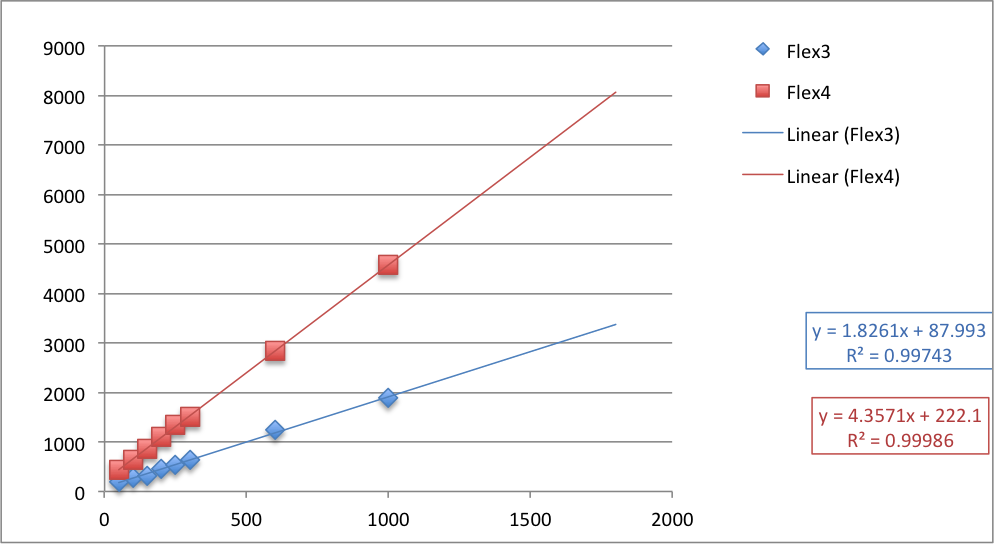 |
| Fig. 3 Flex 4 vs. Flex 3 Application Runtimes with trend lines and projected period results. |
As you can see, Flex 3 and Flex 4 run times increase linearly with the number of components added, and Flex 4's rate of increase is higher. The projected results fit the observed data very well.
I also graphed the difference at each level:
 |
| Fig. 4 Difference in Flex 4 runtime vs. Flex 3 runtime by number of statically defined longest running components. |
This difference also progressed in a generally linear manner with the number of components. It appears that the number of components defined and on the display list at author time does effect overall application performance and confirms that Flex 4 architecture does perform worse than Flex 3 when statically defined. However, in a small application like that in Test 1 the smaller file size will still result in a faster human perceived performance.
This led me to wonder what would happen in a large, dynamic application. Would component run time increase linearly throughout the life of an application where components were added dynamically? Would dynamic addition of components occur more quickly in Flex 4 vs. Flex 3? Over time, in a large application, would runtime performance improve as a result of additional engineering for larger applications built into Flex 4's new architecture? So I wrote test number three, which builds off of tests 1 and 2. This time, I was interested in the component runtimes of dynamically added buttons, added one at a time to the display list at 10 millisecond intervals until the timer had run 1000 times. Then I would measure the component runtimes and graph the results.
Test 3
The results of Test 3 were much more complex than those of Tests 1 and 2. As you might expect, after the application complete event, adding components is much more expensive for a period of time, then it levels off and begins a linear performance. The result table is long, but Flex 3 performed better again. What is most interesting is the visualization of the data:
 |
| Fig 4. Flex 4 vs. Flex 3 Performance with dynamically added components. |
This chart is very complex, because the data returned from this test was very complex. The Flex 4 results perform in a generally Logarithmic manner: very high component run times until more than 60 components are added, then a steep linear trend from components 48 - 450, then a more gradual trend above 450 components. Flex 3 also is generally logarithmic and follows a similar pattern, but its trend lines start at a lower number of milliseconds than Flex 4's, and finish lower than Flex 4's: indicative of better performance in this test.
Conclusions and Additional Points of Discussion
From the above three tests, Flex 4 always performs more poorly than Flex 3 at run time. Each of the spark components performed more poorly than the mx counterpart and the processing of the display list appears to have regressed from Flex 3's performance in both static and dynamic component addition. According to test 1, the Flex 4 components perform at an average of 531 milliseconds or 163.41% worse than their Flex 3 counterparts. Flex 4 produces a much smaller swf executable than Flex 3, thus improving small application's perceived performance time, but ultimately in large, dynamic applications the improvement in download time will only be noticeable for the initially statically defined views and module download times. Any components dynamically added up to the 60th component will probably cause performance issues and a jittery UI. Although Flex 3 has a bigger initial hit, it performs better throughout the lifetime of the application.
Flex 4 has better look and feel extensibility of its built-in components, meaning that you won't be spending as much time in development extending and sometimes duplicating base flex components from a business/behavior logic standpoint, but this extensibility comes at a performance cost over 1.5 times worse on average per component to the end-user.
When we write software, we shouldn't be as concerned with how HARD that software is to write, maintain, and extend as we are about end-user experience. The web has taught us that performance should be our number one concern when writing web applications, and thus Flex 4, while easier to develop and maintain than Flex 3, and thus less likely to be broken by a poorly skilled developer, should probably be avoided until Adobe and the Flex community can bring its performance on par with Flex 3. There is no reason that the overhead of separating view from behavior should have decreased component performance by nearly double when the base codebase of both architectures should have improved from Flex 3 to Flex 4. The community of Flex Framework developers should probably be looking to improve performance in the Flex 4.5 release, rather than adding more components to the spark architecture.
What do you think? Feel free to download the source code from Github and the spreadsheets as well. Comment back. I'd love to see your feedback.
Monday, February 7, 2011
Comma-Separated-Value Strings As Static Const Collections
Have you ever wanted to define a constant set of specific values in ActionScript 3 or JavaScript? In ActionScript 3, you could of course use a
The Array objects in both variants of ECMAScript-262 are mutable, meaning that they are subject to change at runtime. Additionally they are objects and thus are passed as pointers to their place in memory, meaning that any changes made on the arrays will ripple throughout your code, affecting any code storing a reference to your "constants".
Immutability
When you truly want something to be constant, you want that something to not only never change but be impossible to change at runtime. Collections in ActionScript and JavaScript are mutable by their very nature: they are designed to change. Collections are sorted, the keys and values are shifted, pushed, and deleted, etc. Sure, you can define a variable like the following:
However, at runtime, any references to
How do we achieve the intended results? By using an immutable type to store the value.
Strings
So we need an immutable type. Strings are immutable. This means that they do not change. You might be asking, "Wait a second. I can change a string. I can call
Strings are not only value types, but are also immutable. When you update a string by concatenating another string to it, you are actually creating a new string from the two concatenated substrings. This substring is then placed in memory at the location of the old string, making it appear that the string has changed. The string itself has not changed, it has been replaced.
This means they make effective constants. You use string constants all the time in ActionScript:
Using Data Transfer Formats As String Constants
A simple string can't act like a collection can it? Ever heard of CSV? It stands for comma separated value, and it is a data transfer format. Data transfer formats are useful formats for encoding objects into a transportable form. In the case of a collection, we're talking about encoding a list of values into a string.
For simple collections of value primitives, CSV formatted strings work quite well:
private Array variable within a class definition, implementing external access to it as a read-only getter. In JavaScript, you could implement a closure within your object structure that would return the set of values as an Array object. However, both of these implementations have a number of holes, assuming you want your set of values to truly be constant.The Array objects in both variants of ECMAScript-262 are mutable, meaning that they are subject to change at runtime. Additionally they are objects and thus are passed as pointers to their place in memory, meaning that any changes made on the arrays will ripple throughout your code, affecting any code storing a reference to your "constants".
Immutability
When you truly want something to be constant, you want that something to not only never change but be impossible to change at runtime. Collections in ActionScript and JavaScript are mutable by their very nature: they are designed to change. Collections are sorted, the keys and values are shifted, pushed, and deleted, etc. Sure, you can define a variable like the following:
const MY_COLLECTION = [1,2,3,"bob"];
However, at runtime, any references to
MY_COLLECTION can move 2 before 1, delete "bob", etc. Not good if you intended the collection to be constant, and not good if you don't want the changes in the collection to ripple throughout your code base.How do we achieve the intended results? By using an immutable type to store the value.
Strings
So we need an immutable type. Strings are immutable. This means that they do not change. You might be asking, "Wait a second. I can change a string. I can call
substr(), push new characters on the string, concatenate it, etc. Strings can change." Actually they can't.Strings are not only value types, but are also immutable. When you update a string by concatenating another string to it, you are actually creating a new string from the two concatenated substrings. This substring is then placed in memory at the location of the old string, making it appear that the string has changed. The string itself has not changed, it has been replaced.
This means they make effective constants. You use string constants all the time in ActionScript:
Event.EVENT is one common example, used in event addition and handling. Defining a usable collection constant is very easy as well: use a string.Using Data Transfer Formats As String Constants
A simple string can't act like a collection can it? Ever heard of CSV? It stands for comma separated value, and it is a data transfer format. Data transfer formats are useful formats for encoding objects into a transportable form. In the case of a collection, we're talking about encoding a list of values into a string.
For simple collections of value primitives, CSV formatted strings work quite well:
const MY_COLLECTION = "1,2,3,'bob'";
A CSV doesn't have to be comma-separated, though. If you want your values to be strings that contain commas, you can use spaces, tabs, underscores, exclamation marks, separator tokens ("%sep%"), special unicode characters (\u10225), etc. As long as you separate each string with the same token, all you need to do to turn the string into an array when you want to use it is to call
split() on the string, passing your separator token as the parameter. This will return the collection.I particularly like using CSV constants when I need an enumeration of a few values, like "cat", "dog" or "turtle" for a list of possible pets.
const PETS = "cat,dog,turtle";
This type of enumeration comes in handy when I'm validating entries in setters. For this example, I want to make sure that the value for the pet setter is either dog, cat, or turtle. Wouldn't want any rats or roaches for pets.
public static const PETS = "cat,dog,turtle";private var _pet:String;public function set pet(value:String):void{if(PETS.indexOf(value) !== -1){_pet = value;}}
You can use any of the
String object methods on your collection constant. Here I used the indexOf() method to check to make sure the value was valid.CSVs may not cut it if you are using more complex objects. In those cases you can use other data transfer formats, like XML, JSON, or YAML. Just be sure to use the string notation of these formats, so that they are immutable. These types of constants can be rehydrated throughout your applications and libraries where they need to be used, and the resulting objects can even be changed, without affecting other portions of your application that use the same constant.
Happy coding!
Friday, February 4, 2011
RE: You Must Learn JavaScript
If you are already a .js Ninja then you know about many of the things I'm going say in this post, so you can skip it. This post is a response to a post on theNerdary post "You Must Learn JavaScript." In the post, Kenny Meyers insists that the single most important language to learn is JavaScript, because 99% of companies will have need for it. Some comments on the post stipulated that JavaScript is important for the web developer only. This used to be true, but is no longer the case.
JavaScript: Not Just For Web Developers
For many years, JavaScript was a simple way to do really bad things to your Geocities page. Marquee scrollers, biplane banner-like mouse cursors, auto-scrolling text, pop-up bombs, etc. Then it became a way to show and hide elements by manipulating css properties. Then came Ajax, and with it, the Ajax Revolution that has recently led to the whole HTML5 vs. Flash debate.
While all of this was happening, some were trying to push JavaScript into new arenas – embeds in Java applications, server-side code, and even desktop APIs. Rhino was one of the first server-side JavaScript implementations I can remember. The Windows Media SDK used it as the scripting language when Windows Media Player was embedded in desktop applications.
None of these efforts were really taken as serious applications built on JavaScript, and today it remains largely a DOM manipulation and asynchronous request language. However, the future is coming, and that future probably is JavaScript.
Why? JavaScript engines have become fast and robust. This means JavaScript can do more in less time and do it more reliably. I liken it to the performance improvements made to the JVM that pushed Java into being the single most important language on the planet circa 2000. Another similarity with Java is that, for the most part, JavaScript is the write-once-deploy-everywhere language Java was supposed to be.
In addition, the language is ubiquitous. Nearly every web-site in the world has at least some JavaScript, and nearly every web developer knows at least some JavaScript. This means that there already exists an enormous pool of talented js developers for businesses to draw from to create great applications. The adoption rate of a language is a huge contributing factor to a language's success. Smalltalk is a great language. It influenced nearly every modern OO programming language. Hardly anybody uses it. Haskell is great too, however it mainly remains relegated to academia. JavaScript, on the other hand, is used by nearly every major corporation and every major web enterprise worldwide.
These two developments, talent pool and performance, have created a pressure for JavaScript to move beyond the browser.
Node.js
Node is an evented IO framework built on V8, Google Chrome's JavaScript engine. What can you do
with Node? How about a highly scalable http or XMPP server. How about a database? JavaScript has invaded the server with a vengeance. Check out some of the modules available for Node. Want to build that next great thing but don't know .net, PHP, Java, or Ruby, but do know js? Give Node a try.
Appcelerator's Titanium
Titanium brings JavaScript to the desktop (and mobile) world. Why make a desktop app when you can make a web app? Because the interaction is richer and the runtime experience is constant. When you make a commercial web application you have to take into account the wide variation of platforms and bandwidths your users have access to: Windows XP/Vista/7, Linux, Mac, Safari, Chrome, Opera, IE<9, IE 9 beta, conqueror, etc. More often than not, you have to tame down your feature set, or support a number of different feature sets, HTML markups, and CSS presentations to reach all of your available audience. Titanium allows you to use all the new HTML5 markup and CSS3 presentation technologies without having to worry if your target audience only has access to IE6 on Windows XP. It is able to do this because it uses the WebKit rendering engine as its presentation layer. It also exposes file I/O, OS integrated drag and drop, and many of the other features that are not easily accessible to a web application. It also means that you don't need to know Flash/Flex/Air, the .net Application Framework, GTK, or Cocoa to build desktop applications that can run offline and synchronize with the cloud when connected.
Mobile
Like it or not, the world now holds the computing power of the Playstation 2 in the palm of it's hand. If you thought developing for the fragmented desktop or web world was difficult, mobile is a whole new ballgame. Android is fractured, requiring you to know every version of the framework, iPhone suffers from less prevalent fracturing, BlackBerry is still behind those in functionality, and all use different languages for their app runtimes. Though iPhone rules the mobile market, no one OS dominates the market enough to simply ignore the other mobile operating systems. The one thing that permeates all of the major players is the web, and JavaScript is the only scripting language that runs in browsers, making it the only language capable of reaching users on all platforms.
Conclusion
JavaScript is the future. If you want to be a profitable 21st century software firm or a successful developer in the 21st century, you need to know JavaScript. You need to know JavaScript because it is everywhere, from the database to the iPhone. It's influence is growing. You must learn JavaScript because it is becoming this century's version of the C programming language: ubiquitous and used everywhere.
As always comments are welcome.
JavaScript: Not Just For Web Developers
For many years, JavaScript was a simple way to do really bad things to your Geocities page. Marquee scrollers, biplane banner-like mouse cursors, auto-scrolling text, pop-up bombs, etc. Then it became a way to show and hide elements by manipulating css properties. Then came Ajax, and with it, the Ajax Revolution that has recently led to the whole HTML5 vs. Flash debate.
While all of this was happening, some were trying to push JavaScript into new arenas – embeds in Java applications, server-side code, and even desktop APIs. Rhino was one of the first server-side JavaScript implementations I can remember. The Windows Media SDK used it as the scripting language when Windows Media Player was embedded in desktop applications.
None of these efforts were really taken as serious applications built on JavaScript, and today it remains largely a DOM manipulation and asynchronous request language. However, the future is coming, and that future probably is JavaScript.
Why? JavaScript engines have become fast and robust. This means JavaScript can do more in less time and do it more reliably. I liken it to the performance improvements made to the JVM that pushed Java into being the single most important language on the planet circa 2000. Another similarity with Java is that, for the most part, JavaScript is the write-once-deploy-everywhere language Java was supposed to be.
In addition, the language is ubiquitous. Nearly every web-site in the world has at least some JavaScript, and nearly every web developer knows at least some JavaScript. This means that there already exists an enormous pool of talented js developers for businesses to draw from to create great applications. The adoption rate of a language is a huge contributing factor to a language's success. Smalltalk is a great language. It influenced nearly every modern OO programming language. Hardly anybody uses it. Haskell is great too, however it mainly remains relegated to academia. JavaScript, on the other hand, is used by nearly every major corporation and every major web enterprise worldwide.
These two developments, talent pool and performance, have created a pressure for JavaScript to move beyond the browser.
Node.js
Node is an evented IO framework built on V8, Google Chrome's JavaScript engine. What can you do
with Node? How about a highly scalable http or XMPP server. How about a database? JavaScript has invaded the server with a vengeance. Check out some of the modules available for Node. Want to build that next great thing but don't know .net, PHP, Java, or Ruby, but do know js? Give Node a try.
Appcelerator's Titanium
Titanium brings JavaScript to the desktop (and mobile) world. Why make a desktop app when you can make a web app? Because the interaction is richer and the runtime experience is constant. When you make a commercial web application you have to take into account the wide variation of platforms and bandwidths your users have access to: Windows XP/Vista/7, Linux, Mac, Safari, Chrome, Opera, IE<9, IE 9 beta, conqueror, etc. More often than not, you have to tame down your feature set, or support a number of different feature sets, HTML markups, and CSS presentations to reach all of your available audience. Titanium allows you to use all the new HTML5 markup and CSS3 presentation technologies without having to worry if your target audience only has access to IE6 on Windows XP. It is able to do this because it uses the WebKit rendering engine as its presentation layer. It also exposes file I/O, OS integrated drag and drop, and many of the other features that are not easily accessible to a web application. It also means that you don't need to know Flash/Flex/Air, the .net Application Framework, GTK, or Cocoa to build desktop applications that can run offline and synchronize with the cloud when connected.
Mobile
Like it or not, the world now holds the computing power of the Playstation 2 in the palm of it's hand. If you thought developing for the fragmented desktop or web world was difficult, mobile is a whole new ballgame. Android is fractured, requiring you to know every version of the framework, iPhone suffers from less prevalent fracturing, BlackBerry is still behind those in functionality, and all use different languages for their app runtimes. Though iPhone rules the mobile market, no one OS dominates the market enough to simply ignore the other mobile operating systems. The one thing that permeates all of the major players is the web, and JavaScript is the only scripting language that runs in browsers, making it the only language capable of reaching users on all platforms.
Conclusion
JavaScript is the future. If you want to be a profitable 21st century software firm or a successful developer in the 21st century, you need to know JavaScript. You need to know JavaScript because it is everywhere, from the database to the iPhone. It's influence is growing. You must learn JavaScript because it is becoming this century's version of the C programming language: ubiquitous and used everywhere.
As always comments are welcome.
Wednesday, February 2, 2011
Flash Builder 4 -dump-config Additional Compiler Options Documentation Bug
According to the Adobe Online Documentation for Flash Builder 4, when you want to dump the config file of a project you have to use the absolute path to define where you want the config file to be. This is incorrect.
To dump a config, open Project->Properties->Flex (Library) Compiler and add the following to additional compiler options: -dump-config {pathRelativeToProjectSrcFolder}/{configFileName}.xml. For me, {pathRelativeToProjectSrcFolder} is ../ANT as I store my configs for automated builds on Hudson inside each project under the project root in ANT. I usually name my config file the name of the project with -config.xml. So for an imaginary project called Dump, the file structure looks like this:
To dump a config, open Project->Properties->Flex (Library) Compiler and add the following to additional compiler options: -dump-config {pathRelativeToProjectSrcFolder}/{configFileName}.xml. For me, {pathRelativeToProjectSrcFolder} is ../ANT as I store my configs for automated builds on Hudson inside each project under the project root in ANT. I usually name my config file the name of the project with -config.xml. So for an imaginary project called Dump, the file structure looks like this:
- Dump
- src/
- Default Package/
- Dump.mxml
- libs/
- bin-debug/
- ANT/
- dump-config.xml
Subscribe to:
Posts (Atom)